How to Reset or Renew Your IP Address on Windows
If your internet connection is not working properly, websites are not loading, or Windows shows a network error, renewing your IP address can sometimes help.
Windows lets you release your current local IP address and request a new one from your router using a few built-in commands.
What Does Renewing an IP Address Do?
Most home networks automatically assign an IP address to your computer using DHCP. When you renew your IP address, Windows releases the current local IP address, requests fresh network information from your router, and reconnects your computer to the local network.
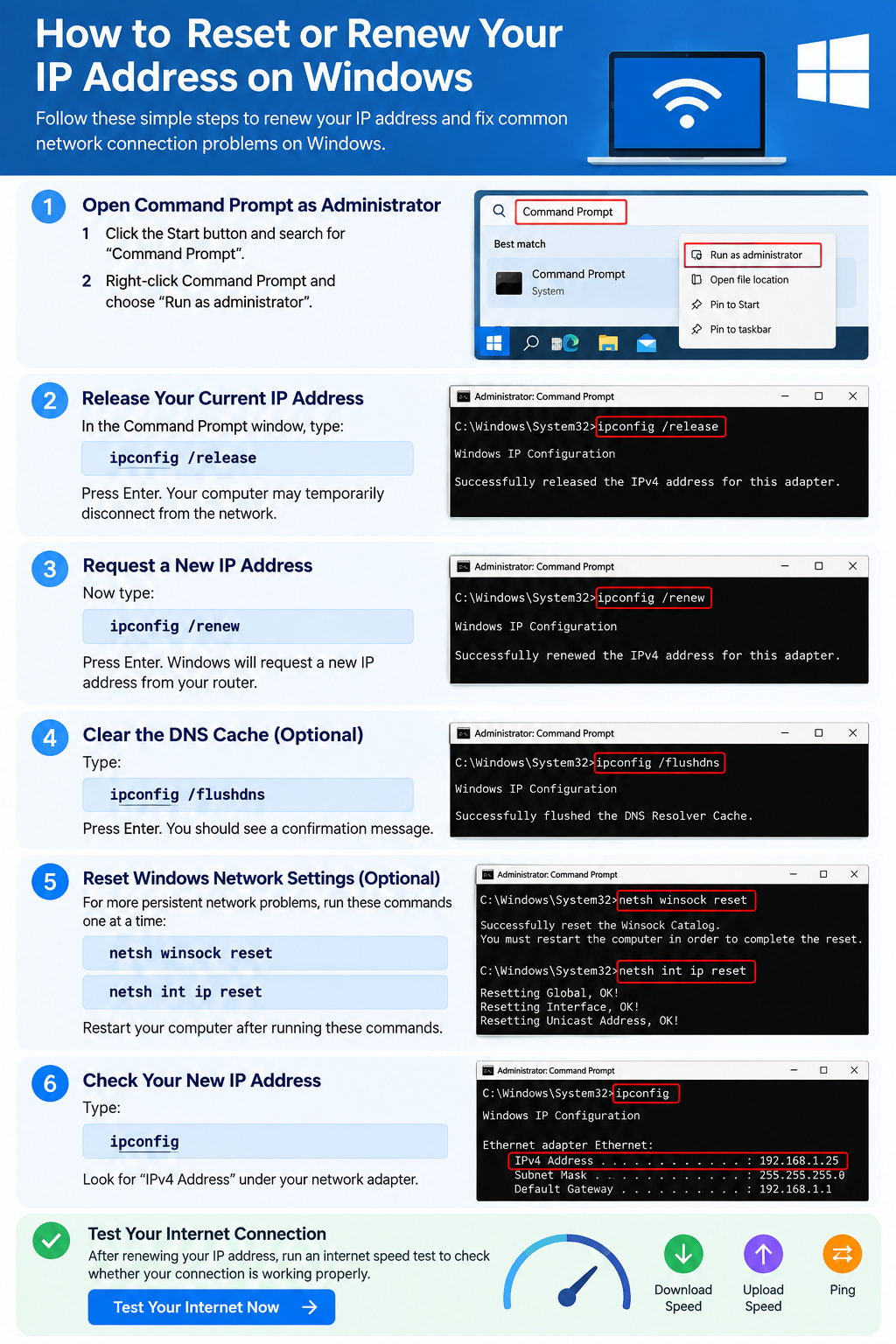
How to Renew Your IP Address on Windows
Step 1: Open Command Prompt as Administrator
Click Start, search for Command Prompt, right-click it, and choose Run as administrator.
Step 2: Release Your Current IP Address
ipconfig /releaseYour computer may temporarily disconnect from the network. This is normal.
Step 3: Request a New IP Address
ipconfig /renewClear the DNS Cache
ipconfig /flushdnsThis clears locally cached DNS information. It does not normally change your public IP address.
Reset Windows Network Settings Using Commands
netsh winsock resetnetsh int ip resetRestart your computer after running these commands.
Complete Windows Network Refresh
ipconfig /release
ipconfig /flushdns
ipconfig /renew
netsh winsock reset
netsh int ip reset
Will Renewing My IP Change My Public IP Address?
Usually, no. The address renewed by ipconfig /renew is normally your local IP address. Your public IP address is normally assigned by your internet service provider.
How to Check Your Windows IP Address
ipconfigLook for IPv4 Address under the network adapter you are using.
When Should You Renew Your IP Address?
- Your computer connects to WiFi but has no internet access.
- Windows reports an IP configuration problem.
- Your router was recently restarted or replaced.
- Your network connection appears stuck.
- You recently changed networks.
Test Your Internet After Resetting the Connection
Once your computer reconnects, run a speed test and compare your download speed, upload speed, and ping.
Frequently Asked Questions
Is it safe to run ipconfig /release and ipconfig /renew?
Yes. These are standard Windows networking commands. Your connection may disconnect briefly while the address is renewed.
Does renewing an IP make the internet faster?
Not normally. It does not increase your internet plan speed, but it can resolve some local network configuration problems.
Does ipconfig /flushdns change my IP address?
No. It clears cached DNS information stored by Windows.
Check Your Internet Connection
After renewing your IP address, use FreeInternetTest.com to check whether your connection is working normally.